Skills Set:
- Experience working any deployment tool & configuration management tool like Ansible(Must).
- Experience with Docker, Kubernetes, Jfrog-Artifactory or Nexus , Jenkins or GitLab, Ansible and canary deployments.
- Linux and networking basics (configuring SSL, IPTables,TCP/UDP, Troubleshooting)
- Software development experience in Bash/Python.
- For Solution Architect (JS-6) Designing experience is must to have.
- Cloud technologies (AWS/Azure) will be huge plus.
- Experience with vMware : on that front we can secure at least 4-5 profiles as we discussed that’s for TMO programme.
sudo xattr -rd com.apple.quarantine /Applications/qBittorrent.app
#skills
Experienced IT professional with specialization in Release Management and DevOps. Highly skilled in AWS, Ansible, Docker, Kubernetes, Jenkins pipelines, CI/CD, GIT, New Relic, Splunk.
- Working for migrating and hosting applications on AWS based on customer needs
- Working on WAF and Security for various client apps hosted on private servers and AWS
- Setup, deploy and manage applications on AWS
- Experience with container based deployments using Docker, working with Docker images, Docker hub and Docker registries, installation and configuring Kubernetes and clustering them.
- Developed infrastructure as code using Terraform combining third-party modules with client-specific code and Deployed the infrastructure in the Amazon cloud, debugged all issues, and wrote the deployment documentation.
- Proficiency in Infrastructure as Code (IaaC) using CloudFormation templates or terraform for provisioning and managing AWS resources.
- Used ansible written custom playbooks for provisioning instances on cloud as well as managing configuration across different instances.
- Converted existing AWS infrastructure to Serverless architecture (AWS Lambda, Kinesis), deployed via Terraform and AWS CloudFormation
- Configured auto-triggered, auto-build and auto-deploy with the CI/CD Tools like AWS Cloud Tools (CodeCommit, CodeBuild, CodeDeploy and CodePipeline).
- Using Python Boto3 library scripts to Automate various configuration either via utilizing existing API’s or services
- Deployment of packages on EC2 AutoScaling groups using CodeDeploy for Blue/Green deployment and In-place servers
- Proficient in AWS services like ECS, VPC, EC2, S3, ELB, Auto scaling Groups (ASG) Launch Configuration, IAM, Cloud Formation, Cloud Watch, SNS, Metric Filter, ELB.
- Experience with Nginx as a load balancer.
- Use CloudFormation for creation and automation of multiple AWS services and infrastructure like configure a build pipeline and provision an AWS ECS compute cluster. Deployment of code to DEV/QA/PROD though CodeDeploy.
- Identify performance bottlenecks and optimise the performance using solutions like database indexes, Varnish, Memcache, Redis , CloudFront etc.
- Implement auto-scaling
- Automate deployments(CI&CD) & other repetitive tasks using shell/Python scripts or tools like Capistrano, Jenkins, CodeDeploy etc.
- Converted existing AWS infrastructure to Serverless architecture (AWS Lambda, Kinesis), deployed via Terraform and AWS CloudFormation
- Configure centralized configuration management using tools like Chef/OpsWorks, Puppet, Ansible etc.
- Experience with Nginx as a load balancer.
- Implement automated backups
- Configure automated alerts/alarms and act on any outages/incidents
- Ensure that the infrastructure is secured and can be accessed from limited IPs and ports
- Manage permissions, backup and performance across different databases like MySQL, MSSQL, Postgres etc.
- Coordinate with development teams to fix issues, release new code
- Manage teams across multiple projects
- Understand client requirements, propose solutions and ensure delivery
- Innovate and actively look for improvements in overall infrastructure
- Experience with using Infrastructure as Code to manage a fleet of Kubernetes clusters.
- Observability: Jaeger, Kiali, CloudTrail, Open Telemetry, Dynatrace
- Logging: Elastic Stack (Elasticsearch, Logstash, Kibana), Fluentd, Splunk
- Monitoring: Prometheus, Grafana, Datadog, New Relic
 9958
23924 : Deloitte
Iwtwad@12102017
15-07-1996
8447082926
AWS | Kubernetes | Jenkins | Terraform | Ansible | Cloud formation | AWS ECS | Shell Scripting | Groovy
● Design and provision multi-environment based infrastructure to support Digital Transformation for US-based Pet Insurance Company
● Enable deployment of frontend based and microservice based architecture to Kubernetes
● Integrate, and manage multiple AWS services like VPC, EC2, EKS, DocumentDB, MSK,
ElastiCache, API Gateway, CloudFront, etc
● Implement end to end CI/CD processes, allowing for dozens of code updates per hour
with zero downtime and reducing manual work
● Work on cost reduction techniques
● Develop tools for Infrastructure automation using CloudFormation, Ansible, Terraform
● Work with and evaluate third party vendor products
● Help improve the efficiency of current systems and processes, employing best security
practices
● Troubleshoot and debug build and runtime issues
Experienced DevOps Engineer with a demonstrated history of working on technologies like Kubernetes, Cloud, Jenkins CI/CD, Ansible, Terraform, Docker, Linux.
AWS glue
Sql
Redshift
Highly skilled Cloud DevOps Engineer with 7+ years of technical experience in designing, deploying, and maintaining highly available, scalable systems utilizing Amazon Web Services and Google cloud. Adept in utilizing DevOps tools such as Terraform, Kubernetes (EKS/GKE), and Jenkins to deliver exceptional solutions. Possesses strong interpersonal skills, a motivated attitude, quick learning capability, and a team-oriented approach to problem-solving. Certified AWS Solutions Architect, Certified Kubernetes Administrator (CKA), and Red Hat Certified Engineer (RHCE) with a proven track record of success.
1. Building Python Lambda functions which connect to multiple AWS services –
2. Automating services using the Python
3. Developing and deploying code to 100s of accounts via CI/CD-
4. Infrastructure provisioning using complex CloudFormation-
5. Having an excellent understanding of IAM -
6. Working in Enterprise size AWS Organisations-
7. Experience in the AWS Networking services like Direct Connect Gateway and Transit Gateway-
8. Experience in automated account provisioning using Landing Zone or Control Tower-
Experienced DevOps Engineer with a demonstrated history of working in the information technology and services industry.Implementation of Continuous Integration, Continuous Development & Deployment with area of expertise in Mobile Applications.
Worked for setting up DevOps of iOS Enterprise Apps for iPhone using Xcode, Jenkins(CI tools), Github(Version Control System), Test Flight(Beta Testing tool), Sonar Qube(Code Analysis Tool), Play Store(Android App Deployment), AppStore (iOS App Deployment), Docker (Cloud Deployments).
Currently Working on setting up and improving the CI system using open-source tools- Git, gerrit, Jenkins, Nexus, Groovy and Docker.
- Implement and manage Continous Delivery systems and methodologies on cloud.
- Design, manage and maintain tools to automate operational processes.
- Ability to orchestrate infrastructure as Code using terraform.
- Automated Deployment process for both Android and iOS Apps.
Data warehouse, Datalake, pyspark, SQL , SCD , AWS GLUE, S3, Redshift
- Administer and maintain corporate applications and services hosted in AWS cloud with multiple accounts, regions, Virtual Private Cloud (VPC), Route53, S3, EC2, RDS, IAM roles, Load Balancing, and auto scaling.
- Leverage technology (i.e. AWS CloudFormation, Terraform, GitHub, Jenkins etc.) to automate and build “infrastructure as code” and CI/CD pipelines to support new and existing applications. Ensure that the target design accounts for disaster recovery and business continuity.
- Administer one or more corporate applications, software and tools hosted on-prem and AWS cloud environment, such as Okta, Jira, Confluence, Slack, GitHub, Netskope, Active Directory, SCCM, TrendMicro, Google Workspace etc. Analyze and automate associated workflows to improve operational efficiency, and enhance security and stability.
- Automate workflows to support integration between various systems to improve accuracy, security, and operational efficiency.
- Leverage the appropriate technology (like AWS CloudWatch, Elasticsearch/Kibana) to gather metrics and monitor the health/utilization of technical resources, and ensure high availability of all corporate applications.
- Create and maintain technical documentation, including design documents, end user facing documents, run books and production change records.
- Support the corporate network team to manage the global AWS network.
- Assist Tier1 corporate support in troubleshooting and addressing user provisioning, de-provisioning and access issues as needed.
- Diagnose and troubleshoot technical issues, including systems configuration.
- Ensure data integrity and access controls when using the AWS platform.
- Assist with incidents, troubleshoot and resolve issues, perform root cause analysis, and contribute to solutions for ongoing improvements.
- Participate in 24x7 support as necessary.
Mix of Cloud-ops /Devops, Working on kubernetes, docker, AWS, Jenkins, Terraform, Pager Duty, Graffana, Prometheus, ELK, kafka, Mongodb zookeeper, rabitmq etc etc
gpupdate
hey this is the time for the time
C-67, Nanhey Park,Uttam Nagar, New Delhi-110059
ASZPJ3048C\
# Set secrets via environment variables
export TF_VAR_username=(the username)
export TF_VAR_password=(the password)
# When you run Terraform, it'll pick up the secrets automatically
terraform apply
- Designed, deployed, and managed AWS infrastructure, ensuring high availability, scalability, and security for mission-critical applications.
- Automated infrastructure provisioning and configuration using Terraform, reducing deployment time by 40%.
- Implemented an end-to-end CI/CD pipeline for continuous integration, testing, and deployment using Jenkins and Git, resulting in faster and more reliable software releases.
- Orchestrated containerized applications with Kubernetes, optimizing resource utilization and application performance.
- Built Docker containers for various applications, streamlining deployment and minimizing environment inconsistencies.
- Collaborated with development teams to troubleshoot and resolve issues, maintaining robust communication channels.
- Implemented Ansible playbooks for configuration management, reducing manual intervention and ensuring consistency across environments.
- Developed custom Python scripts for automation tasks, such as log analysis, monitoring, and incident response.
- Conducted regular system updates and patch management, ensuring system security and compliance.
- Provided 24/7 on-call support for infrastructure and application issues, minimizing downtime and ensuring smooth operations.
- Monitored system performance using AWS CloudWatch and implemented auto-scaling policies to handle traffic spikes efficiently.
- Collaborated with cross-functional teams to plan and execute disaster recovery and backup strategies.
- Maintained documentation for infrastructure, configurations, and procedures, ensuring knowledge transfer and compliance.
- Mentored junior team members, fostering their professional growth and enhancing team productivity.
- Continuous Integration (CI) using Jenkins and Git for automated code builds and testing.
- Continuous Delivery (CD) pipelines for staging and production environments, ensuring automated and reliable deployments.
- Automated testing frameworks (e.g., JUnit, Selenium) integrated into the CI/CD pipeline for quality assurance.
- Infrastructure provisioning using Terraform to ensure consistent environments for testing and production.
- Automated deployment strategies for Docker containers and Kubernetes orchestration.
- Monitoring and alerting integration to detect issues in real-time during the deployment process.
- Deployment rollback mechanisms for quick mitigation of unexpected issues.
- Documentation of CI/CD pipelines and processes for knowledge sharing and onboarding.
1. **CI/CD Pipeline Management: **
- Design, implement, and maintain robust CI/CD pipelines for our software applications.
- Utilize tools like Jenkins, GitLab CI/CD, or Travis CI to automate the build, test, and deployment processes.
- Scripting using languages like Python, Shell, or YAML to configure and customize CI/CD workflows.
2. **AWS Infrastructure Management: **
- Manage and optimize AWS resources, including Code Commit, Code Build, Code Deploy, EC2 instances, Auto Scaling groups, and RDS databases.
- Create and manage AWS IAM roles and policies to ensure secure access control.
- Implement monitoring and logging solutions using AWS CloudWatch and other relevant tools.
- Proficiency in Infrastructure as Code (IaaC) using CloudFormation templates or terraform for provisioning and managing AWS resources.
- Configure and maintain AWS VPCs, subnets, and security groups.
- Utilize AWS Systems Manager Patch Manager for automated patch management.
3. **IaaC (Infrastructure as Code): **
- Develop and maintain infrastructure code to ensure infrastructure provisioning and configuration is automated, repeatable, and version-controlled.
- Collaborate with software development teams to integrate infrastructure changes into the CI/CD pipeline.
- Implement best practices for IaaC using tools such as Terraform or AWS CloudFormation.
4. **Automation: **
- Continuously identify opportunities for automation and process improvement throughout the development and deployment of lifecycle.
- Write scripts and automation workflows using languages like Python, Bash, or PowerShell.
- Implement automated testing, monitoring, and scaling solutions to enhance system reliability and efficiency.
KUBERNETES ROLE
- Cluster Management:
- Provision and manage Kubernetes clusters on various cloud providers (e.g., AWS, GCP, Azure) or on-premises infrastructure.
- Ensure cluster reliability, scalability, and high availability.
- Infrastructure as Code (IaC):
- Use tools like Terraform or AWS CloudFormation to define and manage Kubernetes infrastructure as code, including nodes, networking, and storage.
- Deployment Automation:
- Implement CI/CD pipelines to automate the deployment of applications to Kubernetes clusters.
- Define and manage Helm charts or Kubernetes manifests for application deployments.
- Containerization:
- Build, optimize, and maintain Docker container images for applications and services.
- Implement best practices for creating secure and efficient container images.
- Monitoring and Logging:
- Set up monitoring solutions (e.g., Prometheus, Grafana) to track the health and performance of Kubernetes clusters and applications.
- Configure centralized logging (e.g., Elasticsearch, Fluentd, Kibana) to collect and analyze logs.
- Security and Compliance:
- Implement security policies and best practices for Kubernetes, including RBAC, network policies, and pod security policies.
- Perform security audits, vulnerability scanning, and patch management.
- Scaling and Autoscaling:
- Configure horizontal pod autoscaling (HPA) to automatically adjust the number of pods based on resource utilization.
- Implement cluster auto-scaling to add or remove nodes as needed.
computer in the part how are your
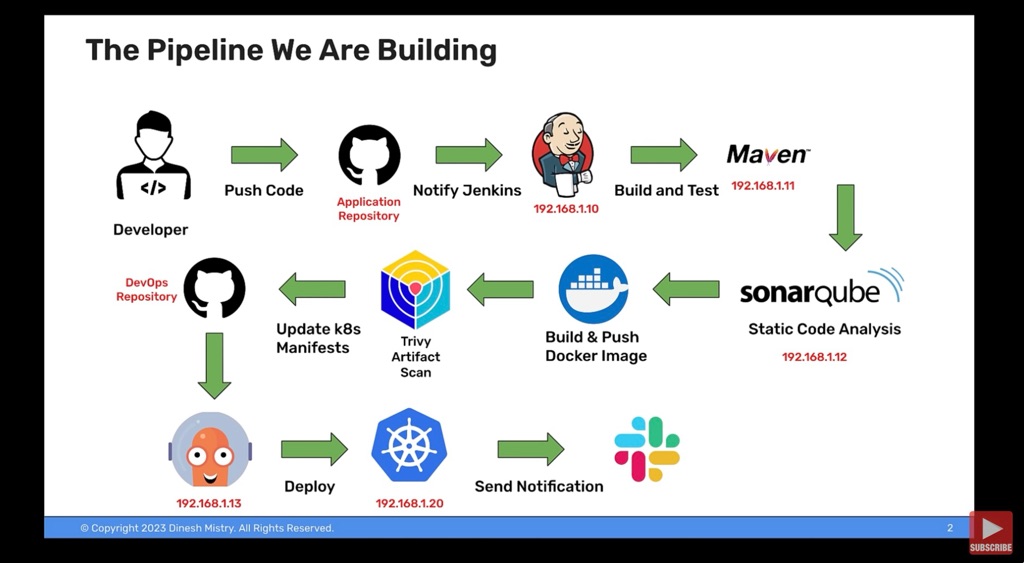
The 7 essential stages of a CI/CD pipeline.
terraform
iac
state
cloudformation
aws
devops jenkins
How is kubernetes configured in your project
- Infrastructure Provisioning:
- Use Infrastructure as Code (IaC) tools like Terraform or AWS CloudFormation to provision the underlying infrastructure where Kubernetes clusters will run. This includes configuring virtual machines or cloud instances, networks, and storage resources.
- Kubernetes Cluster Deployment:
- Deploy Kubernetes clusters using a managed Kubernetes service (e.g., Amazon EKS, Google Kubernetes Engine, Azure Kubernetes Service) or set up self-managed clusters on your infrastructure.
- Configure cluster settings, including the number and type of nodes (workers and control plane), networking (e.g., CNI plugins), and authentication/authorization mechanisms.
- Containerization:
- Containerize your application components using Docker or other containerization tools. Create Docker images for each component, including the application code and its dependencies.
- Kubernetes Resources:
- Define Kubernetes resources in YAML files, including Deployments, Services, ConfigMaps, Secrets, and PersistentVolumeClaims (PVCs), to describe your application's desired state.
- Use Helm charts to package and version your application configurations for easier management.
- CI/CD Integration:
- Set up CI/CD pipelines to automate the building and deployment of container images and Kubernetes resources.
- Use tools like Jenkins, GitLab CI/CD, or GitHub Actions to trigger CI/CD workflows based on code changes.
- Deployment Strategies:
- Implement deployment strategies such as rolling updates, blue-green deployments, or canary releases to ensure smooth and controlled application updates.
- Monitoring and Logging:
- Configure monitoring tools (e.g., Prometheus, Grafana) to collect metrics from Kubernetes clusters and applications.
- Set up centralized logging (e.g., Elasticsearch, Fluentd, Kibana) to capture and analyze logs.
- Auto Scaling and Resource Management:
- Implement Horizontal Pod Autoscaling (HPA) to automatically adjust the number of pod replicas based on resource utilization.
- Optimize resource requests and limits to ensure efficient resource usage.
- Security and Access Control:
- Implement RBAC (Role-Based Access Control) to define and restrict user access to Kubernetes resources.
- Configure network policies to control traffic between pods and namespaces.
- Secrets Management:
- Use Kubernetes Secrets to store sensitive information like API keys or database passwords securely.
- Avoid hardcoding secrets in application code.
- Backup and Disaster Recovery:
- Implement backup and recovery procedures for critical data and configurations.
- Regularly test and validate disaster recovery processes.
- Scaling and Load Balancing:
- Use Kubernetes services and Ingress controllers to manage traffic routing and load balancing.
- Implement Service Mesh (e.g., Istio) for advanced traffic management and observability.
KOPS
Kops, short for "Kubernetes Operations," is a tool for creating, upgrading, and managing Kubernetes clusters on AWS (Amazon Web Services). It helps streamline the process of deploying and maintaining production-ready Kubernetes clusters in AWS environments. Here's how Kops integrates with Kubernetes:
- Cluster Provisioning: Kops facilitates the initial creation of Kubernetes clusters on AWS. It provisions the necessary AWS resources, such as EC2 instances, VPCs, subnets, and security groups, to set up the cluster infrastructure.
- Configuration Management: Kops generates and manages the cluster's configuration, including Kubernetes API server settings, network configurations, and authentication mechanisms. This configuration is stored in a set of YAML files.
- High Availability: Kops supports the creation of highly available Kubernetes clusters by distributing control plane components across multiple availability zones. This ensures resilience against AWS infrastructure failures.
- Updates and Upgrades: Kops simplifies the process of updating and upgrading Kubernetes clusters. It can be used to apply updates, patches, and new Kubernetes versions to an existing cluster. This helps in keeping the cluster secure and up-to-date.
- Add-On Management: Kops includes support for managing Kubernetes add-ons and custom configurations. You can define and deploy add-ons like the Kubernetes dashboard, DNS, and monitoring tools as part of the cluster provisioning process.
- Networking: Kops integrates with AWS networking services to configure networking components like VPCs, subnets, route tables, and security groups. You can choose between various network providers, such as AWS VPC CNI, Calico, or kubenet, depending on your networking requirements.
- Secrets Management: Kops provides options for managing sensitive information, such as SSH keys and API tokens, needed to access and manage the Kubernetes cluster.
- Scaling: Kops allows you to scale your Kubernetes cluster by adding or removing worker nodes to meet changing workload demands. You can adjust the number and type of nodes as needed.
- Validation and Verification: Kops includes validation checks to ensure that the generated cluster configuration is valid and compliant with best practices. It helps catch configuration errors before provisioning the cluster.
- Customization: Kops offers extensive customization options through configuration files. You can tailor the cluster configuration to match your specific requirements, including specifying instance types, node counts, and additional AWS resources.
- Command-Line Interface (CLI): Kops provides a command-line interface for interacting with and managing Kubernetes clusters. DevOps engineers use Kops commands to create, upgrade, validate, and delete clusters.
- Integration with Other Tools: Kops can be integrated with other DevOps tools, such as Helm for managing Kubernetes applications, Prometheus for monitoring, and GitOps pipelines for automated cluster updates.
In summary, Kops is a valuable tool for DevOps engineers and administrators who want to deploy and manage Kubernetes clusters on AWS. It abstracts many of the AWS-specific complexities involved in cluster provisioning, making it easier to create and maintain Kubernetes environments in AWS while following best practices.
TERRAFORM
- Infrastructure Provisioning:
- Terraform is used to define the desired infrastructure state using declarative configuration files written in HashiCorp Configuration Language (HCL) or JSON.
- DevOps engineers define the infrastructure resources they need, such as virtual machines, databases, networks, storage, and security groups.
- Provider Configuration:
- Terraform supports multiple cloud providers (e.g., AWS, Azure, Google Cloud, and others), as well as on-premises infrastructure. Engineers specify the provider and configure authentication and access details.
- Module Usage:
- DevOps teams often create reusable Terraform modules that encapsulate best practices and infrastructure patterns.
- Modules can be shared and reused across projects, enabling consistency and efficiency.
- State Management:
- Terraform maintains a state file that tracks the actual state of the provisioned infrastructure.
- This state file is used to plan and apply changes to the infrastructure.
- Plan and Apply:
- Before making changes, DevOps engineers use Terraform's plan command to preview the changes that will be applied.
- The apply command is then used to enact the planned changes. Terraform calculates the difference between the desired state and the current state and applies any necessary modifications.
- Version Control Integration:
- Terraform configurations are stored in version control systems like Git.
- Infrastructure changes are versioned, making it easy to track and audit modifications.
- Continuous Integration (CI):
- Terraform configurations can be integrated into CI/CD pipelines.
- Automated testing and validation of configurations can be performed in the CI pipeline to catch errors early.
- Secrets Management:
- Terraform allows the use of variables for sensitive data like API keys and passwords.
- These values can be stored securely in environment variables or secret management systems.
- Scaling and Autoscaling:
- Terraform configurations can be designed to handle auto-scaling and resource scaling based on demand.
- Engineers can adjust instance counts, types, and other resource parameters to optimize cost and performance.
AWS SERVICES
- Amazon EC2 (Elastic Compute Cloud): EC2 instances are fundamental for hosting applications, web servers, databases, and other workloads. DevOps engineers often provision, configure, and manage EC2 instances as part of their daily tasks.
- Amazon S3 (Simple Storage Service): S3 is a highly scalable object storage service used to store and retrieve data. DevOps engineers often work with S3 to store and manage application artifacts, backups, and static assets.
- AWS CloudFormation: CloudFormation provides infrastructure as code (IAC) for defining and provisioning AWS resources. DevOps engineers use CloudFormation templates to create and manage AWS infrastructure programmatically.
- Amazon VPC (Virtual Private Cloud): VPC enables you to create isolated network environments within AWS. DevOps engineers configure VPCs to secure and manage network traffic for applications.
- AWS Identity and Access Management (IAM): IAM is essential for managing user access and permissions to AWS resources. DevOps engineers configure IAM policies and roles to control who can perform actions in the AWS environment.
- Amazon CloudWatch: CloudWatch provides monitoring and observability for AWS resources and applications. DevOps engineers set up CloudWatch alarms, dashboards, and logs to monitor application health and performance.
- AWS Elastic Container Service (ECS) and Amazon EKS: ECS and EKS are container orchestration services. DevOps engineers use them to manage containerized applications with Docker and Kubernetes.
- AWS CloudTrail: CloudTrail logs API activity and resource changes in AWS accounts. DevOps engineers use CloudTrail logs for security analysis, compliance, and troubleshooting.
- AWS Systems Manager: Systems Manager offers management capabilities for AWS resources. DevOps engineers use it for tasks like patch management, automation, and configuration management.
- Amazon RDS (Relational Database Service): RDS provides managed database instances for various database engines like MySQL, PostgreSQL, and SQL Server. DevOps engineers work with RDS to set up, manage, and optimize databases.
- AWS Lambda: Lambda allows you to run code in response to events without managing servers. DevOps engineers use Lambda functions for automating tasks, managing serverless applications, and integrating AWS services.
- AWS CodePipeline: CodePipeline is a continuous integration and continuous delivery (CI/CD) service that automates the build, test, and deployment of code changes. DevOps engineers set up and manage pipelines for their applications.
- AWS CodeBuild: CodeBuild is a managed build service for compiling source code, running tests, and producing software packages. DevOps engineers use CodeBuild in CI/CD pipelines to build and package applications.
- AWS CodeDeploy: CodeDeploy automates application deployments to EC2 instances, Lambda functions, and other compute resources. DevOps engineers use CodeDeploy to orchestrate deployments.
Yaml.yml
apiVersion: apps/v1
kind: Deployment
metadata:
  name: simple-webapp
spec:
  replicas: 2
  template:
    metadata:
      labels:
        app: simple-webapp
    spec:
      containers:
      - name: simple-webapp
        image: training/webapp
        ports:
        - containerPort: 5000
  selector:
    matchLabels:
      app: simple-webapp
service.yml
apiVersion: v1
kind: Service
metadata:
  name: simple-webapp
spec:
  type: LoadBalancer
  ports:
    - protocol: TCP
      port: 80
      targetPort: 5000
  selector:
    app: simple-webapp
$ kubectl apply -f deployment.yml
deployment.apps/simple-webapp created

$ kubectl apply -f service.yml
service/simple-webapp created
as a devops enginner how are you building docker image and how are you deploying the cluster and what types of security you will implement as a part of that
As a DevOps engineer, building and deploying Docker images and managing Kubernetes clusters involve several steps and considerations. Here's an overview of the typical process, including security considerations:
Building Docker Images:
- Developing Dockerfile: Developers and DevOps engineers collaborate to create a Dockerfile that defines the application's environment and dependencies. This file serves as a blueprint for building Docker images.
- Continuous Integration (CI): Integrate Docker image building into your CI/CD pipeline. Whenever code changes are pushed to version control (e.g., Git), the CI system triggers image builds.
- Image Registry: Push the built Docker images to a container registry like Docker Hub, Amazon ECR, or Google Container Registry. Ensure that the registry is secure and access-controlled.
- Image Tagging: Use versioned tags for Docker images (e.g., v1.0) to track different versions of your application.
Deploying Kubernetes Cluster:
- Infrastructure Provisioning: Use infrastructure as code (IaC) tools like Terraform or AWS CloudFormation to provision and configure the Kubernetes cluster infrastructure (nodes, networking, etc.).
- Kubernetes Installation: Install Kubernetes on the provisioned infrastructure. Popular options include kops, kubeadm, and managed Kubernetes services like Amazon EKS, Google GKE, or Azure AKS.
- Cluster Configuration: Configure the cluster according to your requirements, including network policies, RBAC (Role-Based Access Control), and cluster-level security settings.
- Application Deployment: Use Kubernetes manifests (YAML files) to define and deploy applications. This includes creating pods, services, deployments, and other Kubernetes resources.
- Continuous Deployment (CD): Implement CD in your CI/CD pipeline to automatically deploy new versions of your application to the Kubernetes cluster when code changes are merged.
Security Considerations:
- Image Scanning: Before pushing Docker images to the registry, scan them for vulnerabilities using tools like Clair, Trivy, or integrated scanning services offered by container registries.
- Access Control: Implement proper RBAC to restrict access to the Kubernetes cluster. Use roles and role bindings to grant least privilege access to users and applications.
- Network Policies: Define network policies to control pod-to-pod communication. Segment your applications to minimize the attack surface.
- Secrets Management: Store sensitive information like API keys, passwords, and certificates securely using Kubernetes Secrets or external secret management tools.
- Pod Security Policies: Enforce security policies on pods to control which container images are allowed, what privileges they have, and which volumes they can access.
- Monitoring and Logging: Implement monitoring solutions like Prometheus and Grafana to detect and respond to security incidents. Centralized logging (e.g., Elasticsearch, Fluentd, Kibana) helps in auditing.