I’m testing out Montaigne.io, a really interesting suite of services online, including one that helps you serve up a blog via Apple Notes.Things I like so far#
- though Apple notes isn’t my favourite place for notetaking, it sure is ubiquitous. I love, love, love that this blog is a series of notes and everything so far (once I got used to the syncing) has worked without any problems.
- I like that the platform is lightweight and accessible to everyone without needing major tweaks. That said I would love the option to tweak just a few more things myself.
- I like that the developer had a specific reason why he created this suite of tools, based on principles he talks about here. I also like what he’s said here.
- I like that it’s named after Michael de Montaigne.
Things I would like control over that I’m not sure are available:#
- centre-aligning elements such as photos and text (I see this is likely on the roadmap)
- a few other font options and some CSS options
- greater support for markdown (though I realise this is a limitation of Apple Notes rather than the service itself!)
- the website mentions a portfolio template but there isn’t an obvious way to set that up
- I want the post navigation in the boxes down below but not the ‘previous’ and ‘next’ links… how to do that?
 But I’m pretty sure you can do them
- how to use anchor links in Apple Notes? (eg on my book links page)
- I know it’s not an Apple Notes thing, but whether there eventually could be some way to add comments?
Some useful links from the montaigne help docs:#
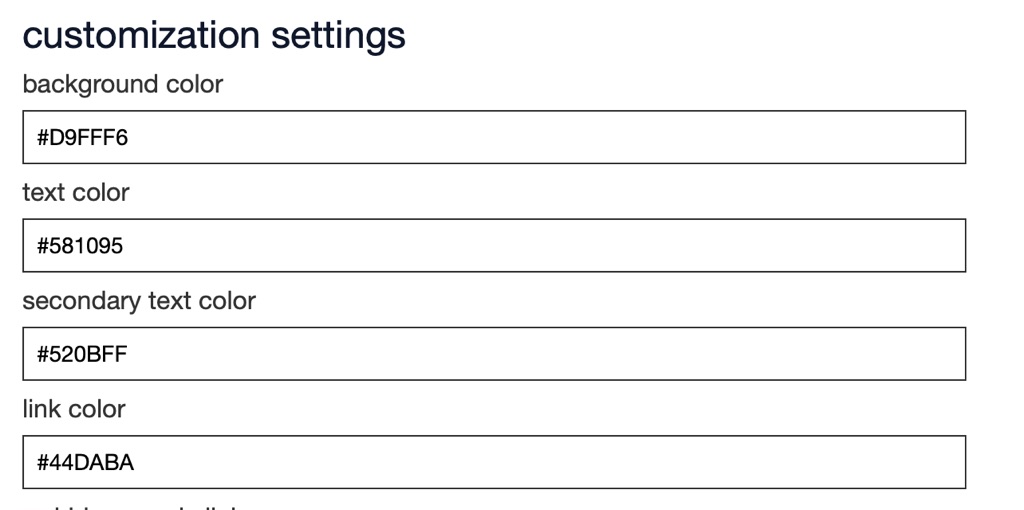
Here are a few of my site’s settings:#
 Here are the colours I like, courtesy of https://hihayk.github.io/scale
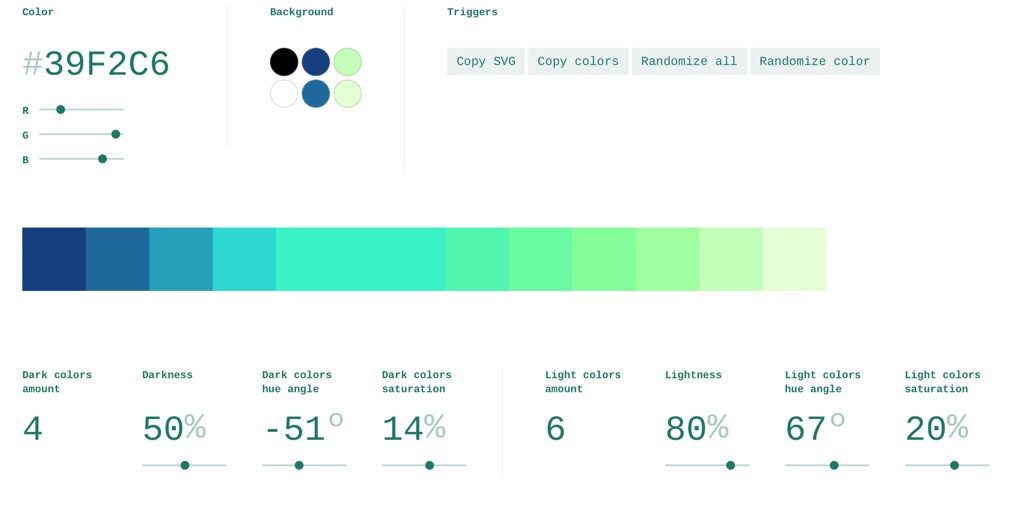 #163F80
#1E6A9D
#269FBA
#2FD7D2
#39F2C6
#51F6B0
#69FAA2
#83FD9C
#9DFF9F
#C4FFB8
#E3FFD4